Phone, broadband, WiFi and cabling work across Greater London. Domestic and small-business. The same engineer turns up, the same number rings.
I've been doing this work since 2011, and before that I was a directly employed engineer with BT — climbing poles, jointing in footway boxes, dropping wires through Victorian sash-window frames and pulling them up under floorboards in mansion blocks. The cards, the kit and the habits all came with me when I went independent. What changed is that now I answer my own phone, I quote my own jobs, and I turn up at the time I said I would.
The three service cards lower down the page cover most of what I do day to day — phone and broadband, WiFi and small networks, structured Cat5e and Cat6 cabling. But the honest truth is that no two London houses are wired the same, and a fair chunk of my week is spent fixing problems that don't fit neatly into any tickbox on a provider's call-handling script. If what you're dealing with doesn't sound like the items on this page, ring the number anyway. After fifteen years of London telecoms I've probably seen something like it before.
Why people ring an independent engineer instead of their provider
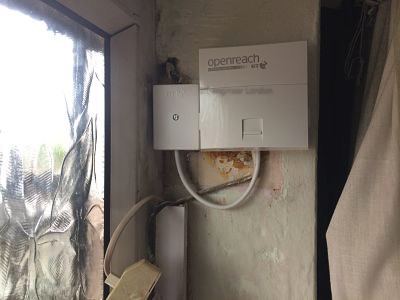
The big providers do an excellent job of putting fibre in the street. What they're less good at, by their own admission, is anything inside your walls. The Openreach demarcation point — usually your master socket — is where their formal responsibility ends. Past that point you're on your own with the wiring, the extensions, the routers, the access points and whatever the previous owner of the house decided to do with a roll of bell wire in 1998. That's where I come in.
Most of my callers fall into one of three groups. The first group has tried to get the provider out, been told the line tests fine, and is now stuck with broadband that drops every evening or a phone that hisses like a kettle. The second group has just moved house and inherited a wiring loom that looks like a plate of spaghetti, and they want it tidied up before they hang a TV or run a home office. The third group is small businesses — a dental practice, a coffee shop, an architect's studio — who need a proper structured install done quietly between bookings, not a weekend warrior with a fistful of crimps.
Last Tuesday in Whitechapel
Genuine job from last week. A flat off Commercial Road in E1, second floor of a converted Edwardian terrace. Broadband had been dropping every evening at about seven, which to the household sounded like "the internet's broken" but which on a tester told a different story. I put a butt-set on at the master, switched to the broadband testhead, and watched the SNR margin sag from twelve down to four as the lights came on across the street. Classic crosstalk — the customer's pair was running in a bundle alongside lines that all turned on heavy electrical loads at the same time of evening. The fix wasn't on the line at all; it was a quick relocation of the master socket from behind the bookcase (where it had been bridged with two metres of unshielded extension cable) to a cleaner termination right by where the drop wire enters the building. Sync rate stable, no more drops. Forty-five minutes including kettle time.
Phone work — what we still do, and why it still matters
People sometimes ring assuming the landline is dead and buried. It isn't. A huge number of London households still have working copper services, alarm systems with PSTN diallers, lift autodiallers in mansion blocks, fax machines (yes, really — a couple of barristers' chambers, a small surgery in Pimlico), and now an enormous installed base of "Digital Voice" handsets that plug into the back of the router. All of that needs maintaining, moving, extending or replacing as the network shifts to all-IP.
- Crackling lines and noisy faults. Usually a bridge tap or an old extension somewhere on the customer's wiring. I trace it back with a tone generator and snip it out.
- No dial tone after a power cut. Often a tripped router on a Digital Voice service. Sometimes a corroded joint in a damp under-stairs cupboard.
- Master socket relocation. Old NTE5A units behind sofas brought forward to a sensible spot — usually near where the router will sit — and re-terminated on an NTE5C with a VDSL faceplate.
- New extensions. Discreet runs in trunking or chased into plaster, terminated properly on insulation-displacement blocks, not screwed into a cracked junction box.
- Tracing buried cabling. Lifting one floorboard in a Hampstead first-floor return to find out where the previous owner ran the line is a normal Tuesday morning.
- Alarm and lift line testing. Where a system has stopped dialling out, I can confirm whether it's the line or the dialler.
Broadband — diagnosis with real test kit, not a speedtest tab
If your router is showing a sync of 38 megs and a speedtest tells you you're getting 12, the broadband isn't broken — something between the router and the device is. Maybe a duff ethernet patch lead. Maybe a saturated WiFi channel. Maybe a long extension on the master that's eating attenuation for breakfast. I carry a proper broadband tester that sits at the master socket and reads the line directly: downstream and upstream sync, attenuation in decibels, signal-to-noise margin, error counts, the lot. That tells me what the line is actually capable of delivering. Then I can compare with what's reaching the kit and locate the difference.
A garden flat in Stockwell
I went out to a basement flat near Stockwell tube last month. The customer's complaint was the classic "WiFi won't reach the back bedroom." Half the people who ring with that phrase don't have a WiFi problem at all — they have a broadband problem dressed up as one. This was different. The line tested clean at the master, sync was sitting at the full FTTC profile, and the router was right next to it. The issue was the back of the property, where the previous owner had built a granny annex with a concrete-lintel doorway between the kitchen and the bedroom. No amount of router shuffling was going to push WiFi through that. The fix was a single ceiling-mounted access point fed by a Cat6 run along the kitchen ceiling void, terminated at a wall plate by the bedside table. Two-hour job, totally invisible finish, and the back of the flat finally got full bars.
WiFi and small networks — survey first, kit second
Half my WiFi callouts begin with a customer who has bought a "WiFi extender" from a supermarket and is wondering why it hasn't fixed anything. The honest answer is that consumer-grade extenders rebroadcast an already-weakened signal, halving throughput at the same time. They're a sticking plaster on the wrong wound. For anything more than the smallest one-bedroom flat I'd rather install one or two professional access points, wired back to the router with Cat5e or Cat6, all broadcasting the same SSID. Your phone and laptop then hand off seamlessly as you walk between floors — which is what every customer thinks consumer mesh kit is going to do for them, and which it actually does about half the time.
A proper job starts with a wireless survey: walking the building with a meter, mapping signal levels per room, noting where the brick walls and the foil-backed plasterboard are, and finding the cleanest channel on 2.4 and 5GHz given the neighbours. From that I can tell you whether one well-placed access point will do or whether you need two — and where the cabling needs to land so the install is clean and concealed.
Cabling — Cat5e, Cat6 and Cat6a, certified to spec
Wired ethernet still wins for anything that needs to be reliable: home offices, gaming setups, TV streamers, security cameras, smart-home hubs, and especially the access points already mentioned. I install Cat5e for general residential runs, Cat6 where there's a reasonable expectation of multi-gig in the next few years, and Cat6a for commercial backbones and PoE-heavy installs.
What you don't get with a botched cabling job is a clear test. Anyone with a cheap "beeper" tester can prove a cable is continuous; what they cannot prove is that it meets the category rating for speed, crosstalk and return loss. I use Fluke DTX and DSX certifiers, the same kit big commercial installers use, and every cable I leave behind gets a printed certification report with the test results. That's what you want behind the wall.
A small office above a deli in Marylebone
An accountancy practice in W1 took on the floor above their existing office and asked for the new space wired up. Original building was a 1930s mansion block, lath-and-plaster ceilings, listed facade — so no chasing the brickwork. The solution was a discreet riser through an existing service void, Cat6 to four desks plus two ceiling access points, all terminated to a small wall-mounted patch panel in a cupboard with the router. Fluke-tested, labelled, documented. They moved their staff in over a weekend and were live on the Monday.
Same engineer, same number, all five years of guarantee
The thing I hear most often from new customers is gratitude that the same engineer they spoke to on the phone is the one who actually shows up. That sounds like a small thing. It isn't. It means the diagnosis you described over the phone doesn't have to be re-explained to a stranger on the doorstep. It means quotes don't drift between booking and arrival. It means if anything's not right afterwards, there's one number to ring and one person to answer.
All work is fully insured and guaranteed. Materials I supply are warrantied through me on top of any manufacturer's terms. Quotes are given by phone after I've heard the problem in your words — there's no fixed price list on this site because no two London jobs are the same, and a tickbox quote is usually the wrong quote.
The kit I carry — and why it matters
The van is loaded with the kind of equipment a directly-employed Openreach engineer would recognise. A proper butt-set for working on copper. A calibrated broadband tester that reads sync, attenuation, SNR and error counts at the master socket independent of the customer's own router. A wireless analyser that maps signal levels and channel use across both 2.4 and 5GHz bands. Tone generators and probes for tracing buried cabling through ceiling voids. Fluke certifiers for verifying every metre of Cat5e or Cat6 I install. Spares for everything I might fit on the day — NTE5C masters, VDSL faceplates, IDC modules, faceplates in white and brushed steel, access points, switches, patch leads in five lengths, a spool of each cable category. The aim is to walk in, diagnose, fix and walk out, on the first visit, in the majority of cases.
How to know whether you actually need an engineer
Honestly, sometimes you don't. Before booking a visit it's worth doing two things. First, power-cycle the router properly — power off, wait thirty seconds, power back on. A surprising number of "the broadband is broken" calls turn out to be a router that's been running uninterrupted for six months and needs a fresh boot. Second, if you've got a noisy or dead landline on a Digital Voice service, check that the green light on the router's phone port is on and that the handset is plugged into the right socket — not the wall socket, which on most modern installs is no longer live for voice. If those two checks don't sort it, ring the number; what's left is almost certainly a real job.
If the symptom is "WiFi won't reach upstairs," try moving the router temporarily into the middle of the property and see whether coverage improves. If it does, the long-term fix is a properly cabled access point at that location. If it doesn't, the problem is somewhere else entirely. Either way, that observation makes the diagnosis on the phone faster.
What customers ring me about most often
- "My broadband is fine in the morning but unusable in the evenings."
- "The line crackles whenever it rains."
- "We've just moved in and there's no master socket anywhere we can find."
- "WiFi works in some rooms but not others."
- "The alarm company can't get a signal out of our line."
- "We're putting in a kitchen extension and need cabling pulled before the plasterers come back."
- "My provider has been out three times and keeps saying the line tests fine."
- "I need a wired ethernet point in the home office and one in the bedroom — discreetly."
If any of those sound familiar, you're in the right place. Ring the number, describe what you've got in your own words, and we'll take it from there.
Ring 020 3633 1131. Advice freely given.