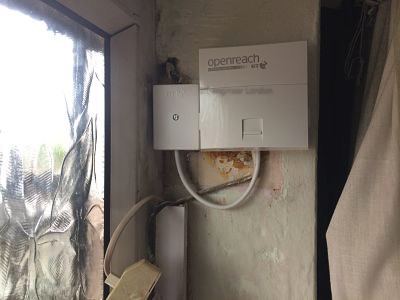
Slow broadband isn't always your provider's fault. About half the time, it's the wiring inside your own walls. The other half it's the Openreach side — and I can tell you which one you've got within ten minutes of arriving.
Your router says it's synced with the exchange at 38 megs. Your laptop says you're getting 9. Where did the other 29 megabits go? Sometimes it's contention on a busy evening, sometimes it's a tired router that needs a power cycle, but more often than not in the houses I visit, it's a worn joint, a long extension, a master socket fitted to the wrong specification or a WiFi signal that wouldn't make it through wet tissue paper, let alone a Victorian load-bearing wall.
I've been an ex-BT broadband engineer in London since 2011, and before that I was a directly employed Openreach engineer doing the same work in a van with a different logo. I carry the same test kit I had then — the proper stuff, the things that actually measure a line — and I use it on every job. Not a speedtest tab in a browser. Real numbers from a real tester at the master socket.
What we actually do on a broadband call-out
The visit usually starts with you describing the problem in your own words at the front door. "It cuts out every evening." "Zoom calls drop." "The Sky box keeps buffering." "It's never been the same since the loft conversion." All of that goes into the diagnosis before I open a tool bag. Then I get the tester on at the master socket and read what the line is actually doing.
That means downstream and upstream sync rates in megabits, attenuation in decibels, signal-to-noise margin (SNR), uncorrected error counts, and how stable the sync is over a few minutes of observation. On an FTTC line I'll also pull the line profile. On FTTP I'm checking the ONT, the LAN port speed and any provisioning oddities. The line tells you almost everything if you ask it properly.
If the fault is on your side of the master socket, I fix it then and there in the vast majority of cases. If it's on the Openreach side — a faulty pair, a dodgy joint in the street cabinet, a profile cap that hasn't been lifted — I'll tell you exactly that, and I'll tell you what to say to your provider so they take it seriously instead of bouncing your ticket. "Ask them to escalate to an SFI engineer with a copy of the line attenuation readings" is a sentence I write out on the back of a card more often than you'd think.
The most common broadband problems I see in London
- ADSL or VDSL line drops. Sync resets every few minutes, unusable speeds, the router log full of "PPP terminated" entries. Usually a degraded joint or excessive bridge tap inside the property.
- Master socket in the wrong place. Behind a sofa, behind a fridge, in a cupboard under the stairs with metres of extension wiring spurring off it. Moved to a sensible location so the broadband signal arrives at the router with the headroom it's supposed to have.
- Amateur extensions. Telephone extensions wired in by general builders or kitchen electricians using untwisted cable or wrong-pair terminations. Often the single biggest cause of slow speeds I find.
- WiFi confused for broadband. The broadband is fine; it's the wireless signal at the far end of the flat that's collapsed. Two different problems, two different fixes.
- Streaming and gaming devices on WiFi. Sky Q boxes, Apple TVs, PS5s, Xbox Series consoles, smart TVs — all happier on a wired link. I run ethernet to them so the WiFi can do less work and do it better.
- Additional wireless access points. Supplied and installed where the genuine problem is coverage rather than the line.
- Crackling line affecting broadband. A noisy line on the voice service usually means the same pair is hostile to DSL too. Fix the noise, fix the sync.
- Loft conversions and rear extensions. Building work that disturbed the original wiring — often the master got buried in plasterboard somewhere it shouldn't be.
Real diagnoses I've done recently
Last Tuesday in Camden
Top-floor flat in a converted terrace off Camden Road, NW1. The customer worked from home, did a lot of video calls, and had been told by their provider on three separate occasions that the line was fine. Their sync was sitting at 27 megs on a profile that should have delivered 55. I plugged the broadband tester into the test socket behind the faceplate — bypassing all the customer's internal wiring — and the line jumped to a clean 58 megs in under a minute. That confirmed the problem was firmly inside their walls. The culprit was a daisy-chained run of unscreened telephone cable that the previous owner had stapled along the skirting through three rooms to put an extension in the bedroom, picking up interference from every device it passed. I removed the offending extension, terminated the master cleanly, and the sync stayed at 58 for the rest of the afternoon. Three months on, no further drops.
A flat in Whitechapel where the line dropped at 7pm
Genuine job from a few weeks back. A flat off Commercial Road in E1, second floor of a converted Edwardian terrace. The broadband cut out every evening at almost exactly seven o'clock, which to the customer sounded like "the internet's broken" but which on a tester told a different story. I put a butt-set on at the master, switched to broadband mode, and watched the SNR margin sag from twelve decibels down to four as the lights came on across the street. Classic crosstalk — the customer's pair was running in a bundle alongside lines that all turned on heavy electrical loads at the same time of evening. The fix wasn't on the line at all; it was a quick relocation of the master from behind the bookcase, where it had been bridged with two metres of unshielded extension, to a cleaner termination at the point the drop wire enters the building. Sync rate stable, no more drops, forty-five minutes including kettle time.
A FTTP install in Battersea that wouldn't behave
Modern fibre install — Openreach had been out and dropped an ONT into a flat in a new build near Battersea Power Station, SW8. Beautiful new copper to the gigabit ONT, lovely brand-new router, and yet the customer's home office at the far end of the flat was getting 40 megs over WiFi when the speed test next to the router read 900. Not a line issue at all. The flat was long and narrow, plasterboard walls but with foil insulation behind them — which is a wireless killer — and the router was at the front door, broadcasting heroically into the kitchen but giving up by the time the signal reached the bedroom-office. A single PoE access point, wired with a discreet Cat6 along the hallway ceiling void, and the office desk now sees the full gig at the wall plate. WiFi at the back end of the flat now sees 600+ on a phone. Different problem entirely, but it always presents as "slow broadband" until you look properly.
ADSL, VDSL, FTTC and FTTP — what's different from your side
From a diagnosis standpoint, the technology underneath your service changes what I'm looking at. ADSL is now the rarest in central London — mostly limited to older lines on cabinets that haven't been upgraded, with sync rates usually somewhere between 2 and 16 megs. VDSL (sold to most people as "fibre to the cabinet" or FTTC) is what the bulk of London is still living on, running copper from the cabinet to the property with sync rates up into the 70s and 80s depending on distance. FTTP is true fibre into the building, with no copper between you and the exchange, and sync rates of 100 megs to a gig or more.
What matters from your side is that copper services are sensitive to the wiring in your home, and fibre services aren't. If you're on ADSL or VDSL, the internal wiring matters enormously and most of my fault-finding lives there. If you're on FTTP, the line itself is essentially perfect and the issues are almost always in your router, your ethernet, or your WiFi. Knowing which you're on is the first thing I confirm at the door.
The bits a provider's call centre won't tell you
Providers run a line test from the exchange when you ring up. That test is checking electrical continuity to the master socket — it can't see what's happening past that point. So when they say "your line is fine," what they actually mean is "the bit we're responsible for is fine." Everything past the master is yours. If your wiring is the problem, they're not wrong, but they're also not going to send anyone to fix it.
The second thing the call centre won't tell you is that, on an FTTC line, your sync rate is partly determined by a profile they set on their kit. If your line has had a long sync at a slow speed for stability reasons, that profile may not lift even after you've fixed the underlying fault. I'll often advise customers to ask their provider to "request a profile reset" after a clean line restore — and that's the difference between living with 25 megs and getting the 55 you're actually entitled to.
What's included on a typical broadband call-out
- A conversation on the doorstep about what the symptoms are and when they happen.
- Visual inspection of the master socket, the router and any visible internal wiring.
- Plugging a calibrated broadband tester into the test socket behind the faceplate to read the line in isolation.
- Plugging the tester into the live faceplate to compare — telling us whether your internal wiring is degrading the signal.
- Speedtests at the router by ethernet and over WiFi, at different rooms, to localise where the loss is happening.
- Any small fixes done there and then — re-termination, removal of bad extensions, refit to NTE5C with VDSL faceplate, master relocation if simple.
- If the fault is Openreach-side, a written summary you can send to your provider with the numbers that matter.
Across all of Greater London, since 2011
I cover everywhere inside the M25 and a fair distance beyond, from the City fringe through North and East London, down into South London and out west to the airport corridor. I've worked in every kind of property the capital has to offer — Georgian terraces in Islington, Victorian conversions in Stoke Newington, mansion blocks in Marylebone, ex-council in Tower Hamlets, new builds in Nine Elms, mews flats in Chelsea, garden offices in Twickenham, basement studios in Notting Hill. The wiring is always different. The diagnostic process is always the same.
What to try before ringing me
Before booking a visit it's worth running through a couple of quick checks. Power-cycle the router properly — off at the wall for thirty full seconds, then back on. A meaningful percentage of "the broadband is broken" calls turn out to be a router that's been running for months without a reboot and just needs a fresh start. If you can, plug a laptop directly into the router by ethernet and run a speed test in that position; compare that with the speed you see over WiFi at the far end of the property. If the wired speed is reasonable but the WiFi speed isn't, the problem is wireless, not broadband. If both are bad, the problem is the line or the router itself. Either observation makes the phone call much shorter and the diagnosis on arrival much faster.
Two other simple checks before ringing: are the lights on the router showing what they normally show (most routers have a sync or "internet" light that should be solid green when all is well) — and is the noise on a wired phone handset normal when you pick it up? Crackling or hissing on the voice service usually means a noisy line that will also affect broadband on the same pair.
Ring 020 3633 1131. Advice freely given.