Angel is one of those London neighbourhoods where the housing changes block to block — antique-shop Georgians on Camden Passage, post-war flats around the Regent's Canal, Edwardian terraces up Liverpool Road, restaurant kitchens behind Upper Street. Every kind of wiring problem you can think of, often in the same working week. I've been doing the telephone, broadband and WiFi work in this pocket of N1 for long enough that there isn't much I haven't seen.
The bread-and-butter jobs in Angel are what you'd expect anywhere — master sockets, crackling lines, broadband speeds that don't match what's being paid for, WiFi black-spots in the back of a long Georgian flat, Cat6 runs for a new home office or a small business above a shop. What's specific to Angel is the building. Almost everything here has been converted at some point, often more than once, and the cabling layered up with each conversion. Working out what's live, what's redundant, and what's been clipped over but never disconnected is half the job.
The Angel housing stock — and what it does to wiring
Walk down Camden Passage from the tube and within five minutes you'll pass an early-Georgian shopfront with a single flat above, a 1970s council block, a Victorian conversion divided into three flats, a brand-new build above a restaurant, and a Grade II listed terrace where you can't even fit a satellite dish without consent. Every one of these properties has had different decisions made about phone wiring over forty years. I've opened up cupboards in Charlton Place and found GPO line cord still doing real work alongside a 2018 ISP router.
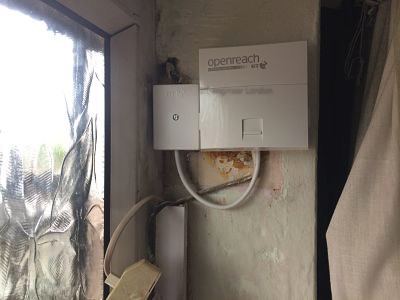
The most common pattern in Angel flats is that the original NTE5 master socket lives in the communal hallway, the previous tenants installed extension wiring up to the flat, and somewhere along the way a junction box was screwed into the staircase woodwork with insulated nails. That delivers a usable phone line but kills the VDSL signal because the daisy-chained wiring acts as an aerial. The fix is normally to bring a new clean run from the master socket up to the flat, fit an NTE5C with a VDSL faceplate inside the flat, and remove the parallel wiring entirely.
Some recurring features I run into in Angel:
- Communal master sockets shared awkwardly between flats — sometimes still wired in parallel rather than properly broken out.
- Antique-shop premises on Camden Passage where the phone line is shared between the shop, the office above and a flat at the top, all on one drop wire.
- Canal-side flats where the original ADSL signal was already marginal and the building's modernisation never updated the internal copper.
- Restaurant offices behind Upper Street kitchens, with the router buried under POS equipment and zero WiFi reaching the front of house.
- Loft conversions over four-storey terraces where the router lives at ground level and the home office is forty feet above it.
Three recent Angel jobs
The first was an antiques dealer on Camden Passage. He'd taken on the unit next door, knocked through, and now had a single shop with two old phone lines, two routers, two WiFi networks and a card-reader that kept disconnecting in the middle of transactions. I attended on a Wednesday morning, traced both lines back to the OpenReach demarcation, ceased one of them at the customer's request, and rebuilt the surviving line onto a new NTE5C in the rear stockroom. Then I ran a single Cat6 to a wall-mounted 802.11ax access point above the till, set up one SSID across the whole unit, and put the card-reader on the same wired switch. He's not had a dropped transaction since.
The second was a Georgian flat on Duncan Terrace, just where the canal goes underground. Listed Grade II, no chasing into walls allowed, owner wanted the WiFi to reach a desk in the converted basement. The router was on the ground floor in the front room, three quite solid walls and a thick floor away from where she actually worked. I ran a Cat6 down the inside of an existing service riser — bone-dry, original Victorian — into the basement, fitted a discreet access point flush to the ceiling, and certified the run on a Fluke. Speeds at her desk went from around 6 Mbps over a struggling extender to a consistent 280 Mbps wired and over 200 Mbps on 5GHz. No drilling visible to anyone.
The third was a restaurant manager on White Lion Street. Her POS system kept dropping during the dinner service, and the kitchen was getting hammered with order errors because the EPOS terminals were on WiFi from a router in the manager's office. Anyone who's worked in a London restaurant kitchen knows the back of house is full of stainless steel, microwave ovens and refrigeration compressors — every one of which trashes 2.4GHz. The proper answer was to wire everything. I ran four Cat6 drops from a cupboard near the cellar door to four POS terminals, fitted a small switch in the cupboard, and kept WiFi for guests only. Failures stopped that night.
The canal corridor and what it does to broadband
The Regent's Canal runs through Angel from City Road basin out towards Camden, and a fair number of flats sit either directly above it or in the warehouse conversions along Wenlock Basin and the canal-side towards Vincent Terrace. Two practical problems come up here. The first is that the OpenReach copper to some of these conversions still runs aerially from poles near the canal — and aluminium drop-wire, in particular, ages badly when it sits over water in damp London winters. Lines that ran perfectly well in 2015 are now picking up noise. If you've got a crackling line in a canal-side flat, the chances are good that the drop wire wants replacing rather than anything inside your property.
The second is that brick warehouse conversions tend to have very thick floor slabs and lots of internal partition walls. Routers placed in a hallway cupboard, which is where the developer normally puts the data point, deliver fine WiFi to the hallway and not much else. The answer is wired access points, usually one per major space, with Cat6 routed through ceiling voids or, where the ceiling is exposed, in matching black trunking that disappears against the original beams.
Upper Street businesses
A lot of Angel's commercial life is on Upper Street and the streets that feed it — Liverpool Road, Cross Street, Theberton Street, Almeida Street. Independents mostly: restaurants, salons, small agencies, gallery spaces. Their telephony needs are usually modest — one or two lines, a card reader, sometimes a VoIP handset — but the WiFi load is heavy because the staff and the customers all expect to be online. I do a steady stream of small-business fit-outs here, and the pattern is reliable: dedicated business line where possible, NTE5C in the back of house, structured Cat6 to wherever the tills, the office and the customer-facing areas need it, then one or two professional access points to handle the actual WiFi.
If you're taking on a unit on Upper Street and you want to know what's already there before you sign — I'll happily do a survey. Knowing whether a unit has its own clean line or shares with the flat upstairs makes a real difference to the cost of fit-out.
FTTC, FTTP and the Angel exchange picture
Most of N1 has had FTTC for years. Angel sits close enough to its cabinets that internal speeds, on a clean line, are usually within shouting distance of the headline figure. FTTP is rolling through the area — some streets have it now, others are scheduled, a few are still copper-only. Whether you can switch to FTTP depends on the specific address and whether OpenReach has run fibre to the property or just to the street.
I'll check availability for any address before I commit to a particular install plan. If FTTP is live at your address, it changes the master socket arrangement entirely — you get an ONT rather than an NTE5C, and the internal data side becomes more important than the copper. We handle both.
What I'd ask you on the phone
When you ring about an Angel job, the things that help me quote on the spot:
- Which ISP, and whether the line is FTTC or FTTP.
- Where the master socket is, if you know — hallway, cupboard, behind the sofa, in another flat?
- Current speed at the router versus the speed you're paying for.
- Where you actually need usable WiFi or wired ethernet to land.
- Whether the property is listed or in a conservation area — almost all of N1 is one or the other.
Most Angel jobs can be properly scoped from a short phone call. The exceptions are large fit-outs and unusual buildings, which need a quick site visit. I work to a tidy standard, leave certified test reports for cabling jobs, and don't leave a mess.
VoIP, SoGEA and the death of the PSTN
One thing I'm asked about more and more in Angel — both by residential customers in the older flats and by businesses on Upper Street — is what's happening with the traditional phone line. The PSTN switch-off has been pushed back more than once but the direction of travel is clear: BT is migrating customers away from analogue voice onto IP-delivered phone services. In practice this means that the analogue handset plugged into the back of your master socket is going to be replaced over the next few years by either a VoIP handset plugged into the router or a SoGEA-style service that delivers broadband without a separate voice line.
For Angel businesses the practical implication is that the resilience of your internet connection matters more than ever. If your phone line is now coming through your router, then a router failure means no phones — not just no internet. We routinely fit a second router on standby for businesses where voice continuity matters, and we sometimes specify a 4G fallback unit that automatically takes over if the FTTC line fails. None of this is expensive but it's worth thinking about before the day the switchover happens.
For residential customers the migration is usually painless. Your phone handset moves from the wall socket to the router. The number stays the same. The one thing to watch for is anyone still using their phone line for an alarm or a personal emergency-response device — those need to be moved to an IP-compatible system before the analogue line is withdrawn at your address.
What good wiring looks like in an Angel flat
The standard I work to in every job — and what an Angel customer should expect to see when I leave — is this:
- A single, current-spec master socket (NTE5C with integrated VDSL faceplate where the line is FTTC) installed somewhere accessible.
- Internal extensions, where required, wired in star configuration from the master rather than daisy-chained.
- All redundant wiring removed, not just disconnected and left in the wall.
- Cable routes that avoid running alongside mains cables for any significant distance.
- WiFi access points placed where they can actually deliver useful signal, wired back to the router via proper Cat6.
- A Fluke test certificate for any structured cabling, so the customer has documentation that the install meets specification.
- The router, switch and any access points labelled clearly so the next engineer or the customer can see what's what.
None of this is hard. It's just doing the job properly. The reason it matters in Angel particularly is that the flats here change hands frequently, and a tidy install with documentation makes the next owner or the next tenant's life considerably easier.
If you've got a current issue in a flat or business in N1 — a crackling line, broadband that doesn't match the bill, WiFi that won't reach a back room, a need for proper Cat6 cabling for a small office — ring me and we'll talk through it. Most jobs in Angel are scoped and quoted from a short phone call, and most are attended within two working days. The few that need a site visit before quoting are the larger commercial fit-outs and the unusual buildings, and I'm happy to do that survey free of charge for any job likely to need significant work.
Ring 020 3633 1131. Advice freely given.