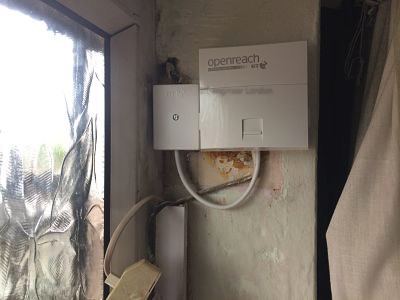
N1 covers Islington, Canonbury, Barnsbury and a sliver of Hoxton — some of the most heavily-converted housing stock in London. Period features matter to the owners here, which means the wiring runs need to be invisible and the master socket has to end up somewhere a designer can live with. I've spent years working in these streets and the brief barely changes: tidy, tested, no exposed cable, and the broadband actually delivering what the bill says it should.
The day-to-day jobs in N1 are the same telephone and broadband problems we get everywhere — relocating an NTE5C master socket, tracing a noisy line back to its source, sorting WiFi that drops out at the back of a long thin Georgian house, running Cat6 to a converted loft that's now somebody's office. What differs is the building. A typical Canonbury terrace might have had its ground-floor wall taken out, the lath-and-plaster ceilings retained, original cornicing nobody wants to chase into, and a Victorian return that ate the entire back garden. You have to plan the route before you take the drill out.
Why N1 wiring tends to be a mess
Most of the housing in Islington and Barnsbury was built between 1820 and 1860. By the time British Telecom was running domestic lines, those houses had already been carved into bedsits, then re-merged into single dwellings, then re-carved again as flats, then converted back. Every owner left their layer of cable behind. I regularly open up a hallway box on Liverpool Road and find old GPO drop wire, an early-1990s NTE5A, three lengths of CW1308 going to nothing, and a master socket bolted to the back of a coat hook. None of it is documented.
What that means for diagnosis is that I rarely trust what I'm told about ‘the existing wiring’. A signal that should arrive at the new faceplate is often running through six unnecessary junctions before it reaches you. The fix is usually to strip everything back to the OpenReach drop, fit a proper NTE5C with an integrated VDSL faceplate, and re-run the internal cable cleanly. Once that's done the line normally tests as the engineer who first installed it would have expected.
Some of the things that turn up specifically in N1:
- Master sockets installed in the basement utility area where the original phone arrived in 1973, with the household using a wireless DECT base on the second floor.
- Cable runs tacked along the picture rail of a listed front room because nobody wanted to chase the wall.
- Old aluminium drop-wire from the canal-side poles still in service, causing line noise that disappears the moment OpenReach replaces it.
- Loft conversions where the WiFi router is two floors below the new home office.
- Garden studios — half of N1 has a garden studio — with no proper ethernet, just an extender plugged into the kitchen.
Three N1 jobs from the last few months
The first one was a four-storey terrace on Cloudesley Square, just off Liverpool Road. The owner had been told by her ISP that her line was ‘within spec’, but she was getting around 12 Mbps down on what should have been an 80/20 FTTC profile. I went out, dropped a test lead into the NTE5A, and the line was fine at the master. The problem was the extension wiring — somebody had spurred off in star pattern to three internal sockets, the original A/B legs were paralleled with bell wire, and the VDSL signal was getting absolutely murdered by the resulting capacitance. I swapped the NTE5A for an NTE5C with a VDSL faceplate, removed the old extension wiring entirely, and ran a single short CW1308 to a new socket by her desk. Sync came back to about 76 Mbps within an hour. Standard story for a converted Georgian.
The second was a small studio above an antique shop on Camden Passage, just down from the Angel tube. The tenant ran a graphic design business and the broadband was ‘working’ but constantly stalling on large file uploads. The flat was on FTTC and the shop below had its own line. The router was a generic ISP unit shoved on top of a bookcase next to the front window, with the brick wall directly behind it. I did a quick walk-through with my WiFi analyser, confirmed the 5GHz signal was dropping below useful levels three metres away because the brick was absorbing it, and recommended an 802.11ax access point wall-mounted in the middle of the flat with a short Cat6 run back to the router. We chased that cable along the skirting where the conservation officer wouldn't see it. Speeds tripled at her desk.
The third was a Barnsbury family home — Lonsdale Square, four floors, basement kitchen, loft conversion, garden office at the back. Classic N1 brief: the WiFi has to reach the children's bedrooms at the top, the parents' study in the loft, the kitchen-diner in the basement, and the garden office twenty metres down the lawn. Mesh alone doesn't do it because each floor is double-thick masonry and the garden office is on the other side of a Victorian rear wall. I ran Cat6 from the basement service room up the service riser to a 4-port switch in the loft, dropped an access point onto each floor, and put a fibre-tolerant outdoor-rated cable through a cored hole into the studio. Fluke certified every termination. The whole property now sits on a single SSID with no roaming gaps.
Working in listed and conservation-area properties
Most of N1 sits inside either a conservation area or has individual listing. Cloudesley Square, Lonsdale Square, Canonbury Square, Milner Square, Gibson Square — they all carry restrictions about what you can do externally, and increasingly the freeholders care about what happens internally too. I don't drill an external wall in N1 without checking what consent is in place. Where I have to bring a new drop wire in, I prefer to follow the original OpenReach route — usually the front bay or down through the lightwell — rather than open up a fresh hole.
Internally, I run cable behind skirting where the boards lift cleanly, under floorboards where the carpet allows, or in a discreet trunking painted in to match. I carry a small kit of conservation-grade trunking specifically for these jobs. If a customer needs the cable to be genuinely invisible, that's chase-and-make-good, which means a plasterer afterwards. I'll be straight about that on the phone — I won't promise an invisible run and then deliver something that looks fine to me and terrible to a designer.
Broadband in N1 — the actual picture
Most of N1 has been on FTTC for years and is now well into the FTTP rollout. The Islington exchange and the Holloway exchange between them cover most of the postcode, and OpenReach has been pushing fibre into the streets at a reasonable clip. The pattern I see on jobs:
- Old terraces near the canal — Wharf Road, Noel Road — typically have very short copper runs and can do close to the FTTC top speed if the internal wiring is clean.
- Properties further from the cabinet (anything towards the back end of Liverpool Road or up towards Highbury Corner) can lose 10–20 Mbps just from copper distance, regardless of internal wiring.
- FTTP is now available on a lot of streets but not all. I'll check on the OpenReach availability checker before I commit to anything that depends on a particular profile.
- Some of the larger conversions still share a single legacy line between flats — that's a recipe for crosstalk and we usually recommend separate provision per flat.
If you've been told your line is ‘the maximum the cabinet can deliver’ and the numbers don't match what neighbours are getting, ring me. Nine times out of ten it's the internal wiring, not the cabinet.
WiFi in long thin houses
The Islington terrace is famously long and thin — a narrow plan with the kitchen extension out the back, a return wall, and a tall stairwell. A single router by the front door cannot cover that geometry, no matter how good its specifications. The 5GHz band in particular has no chance of getting through two double-brick party walls. I always recommend at least one wired access point per floor in a four-storey house, and a separate outdoor-grade unit if there's a garden studio.
I work with Ubiquiti UniFi and TP-Link Omada gear mostly, but I'll fit whatever you've already invested in if it can be made to work. The important part is that the access points are wired back — extenders and mesh-over-WiFi nodes lose half the bandwidth each hop, and in a converted N1 house you've usually got enough hops to make that lethal. Cat6 is cheap. Wireless backhaul is not.
Small offices and home-businesses
A lot of N1 residents run businesses from home — agencies, studios, consultancies — and the boundary between ‘residential’ and ‘small office’ has effectively disappeared. I do a fair amount of work for clients who need a Cat6 patch panel in the cupboard under the stairs, a managed switch, a separate guest SSID, and a router that doesn't fall over every time somebody joins a video call. None of this is particularly exotic kit — it's just specced properly and tested with a Fluke certifier on completion, so you have documentation that every port runs at gigabit and meets the cable standard.
I leave a certified test report at the end of every cabling job. If you sell the house or you bring in new tenants, that report is what the next person needs to know the cabling is genuinely Cat6 and not just labelled Cat6.
Booking and what to tell me on the phone
When you ring, the things that help me quote on the spot are: which line you're with (the ISP), whether you can see an NTE5A or NTE5C master socket and where it is, what the current speed is at the router versus what you're paying for, and where the WiFi needs to reach. If you can describe the building — terrace, conversion, listed, mansion block — that's usually enough to know what we're walking into.
I cover N1 every working day. Most jobs I can attend within 24 to 48 hours, often the same day if the diary allows. Saturday work is available for the small-business end where weekday access is impossible.
How I diagnose a fault in N1 — the actual order of work
Customers sometimes ask how an engineer actually approaches a fault when they walk through the front door. The order matters because it stops you wasting time chasing the wrong cause. In N1 I follow roughly the same routine every time, adapted for whether the symptom is voice noise, slow broadband or unreliable WiFi.
The first step is always the master socket. If there's an NTE5A or NTE5C with a separable faceplate, I unscrew it and test on the engineer's test socket behind it. That removes every bit of internal extension wiring from the picture. If the line is quiet and the broadband is healthy at the test socket, the fault is in the internal wiring or the router setup. If the line is still noisy or the sync is poor at the test socket, the fault is on the OpenReach side and either a drop-wire change or an exchange-side intervention is needed.
Step two, if the fault is internal, is to inspect every existing extension. In a Georgian conversion this usually means lifting at least one section of floorboard or skirting and tracing what's actually connected to what. I carry a tone generator, a probe and a low-voltage continuity tester for this. Half the time we find redundant runs that should be ceased — old extensions to rooms that no longer exist, parallel pairs that were left in when a previous engineer added a new extension on top.
Step three is to clean up. A correctly wired N1 install has one master socket (NTE5C with VDSL faceplate where the line is FTTC), a small number of properly terminated extensions in star configuration from the master, and clean wiring routes that don't run alongside mains cables. Most VDSL noise issues vanish at this stage.
Step four, if the customer's brief includes broadband or WiFi performance, is to test with proper kit. I use a Fluke certifier for cabling. For WiFi I do a quick coverage walk with an analyser to confirm where the dead spots are, then either place an access point appropriately or, more often, run a Cat6 to a sensible location and put a wired access point there. WiFi extenders are almost never the right answer in N1's geometry.
What I leave behind on every N1 job
Some things I do as a matter of habit, partly because customers in N1 often have to demonstrate to a freeholder or buyer that work was done to a proper standard:
- Label every cable termination so the next engineer knows what's what.
- Leave the original master socket details written on the inside of the faceplate where possible.
- Provide a Fluke test report for any new Cat5e or Cat6 run.
- Remove every redundant length of old cable rather than coiling it up and leaving it in the wall.
- Tidy the cable management at the router so the customer can see what plugs into what.
None of this is exceptional. It's what a competent telecoms engineer ought to do. But it matters more in N1 than in less-converted areas because so many of these properties get passed between owners, tenants and short-let operators, and the next person needs to be able to look at the wiring and understand it.
Ring 020 3633 1131. Advice freely given.