Arnos Grove is what people mean when they say ‘outer north London’ — the 1930s suburban semi, the family house with a garden office at the back, the broadband that needs to reach upstairs reliably, the Piccadilly Line a short walk away. Tidy, well-tested installs are the standard out here, and almost every job follows a fairly predictable shape. After many years working the N11 and N14 streets around the station, the patterns are familiar.
The day-to-day brief in Arnos Grove is residential: WiFi that has to cover a three-bedroom semi with the router in the front hall, a garden office at the back needing its own wired connection, master sockets that wandered around the house as conversions happened, broadband speeds that don't match the bill. Where central London brings me Georgian terraces with listing constraints, Arnos Grove brings me 1930s mock-Tudor and inter-war semi-detached housing with cavity walls, suspended ground floors, and gardens long enough to hide a studio at the bottom. Different challenges, same kit.
The 1930s semi and its wiring quirks
The streets around Arnos Park, Bowes Park and along the Bowes Road were built mostly between 1925 and 1939. Speculatively built, three bedrooms, a small sitting room at the front, dining room behind, kitchen extension, garden. These houses age very well structurally, but the way telephone wiring was retro-fitted into them between 1955 and 1990 is haphazard. The original GPO drop went to wherever the householder wanted the single rented phone — often the hallway, sometimes the front room — and as the family grew and lines multiplied, extension wiring sprouted off in every direction.
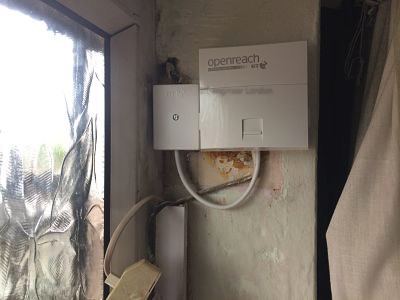
What I find when I open up the master socket box in an Arnos Grove semi is normally one of three things. Either the NTE5A sits in the hall under the stairs and the extension wiring has been daisy-chained to two or three rooms with bell wire. Or the master socket is in the front room where the original phone lived, and the modern router is upstairs trying to send VDSL signal back down a long internal extension. Or — most commonly now — the homeowner has had FTTC installed but the wiring is still the same 30-year-old extension setup that worked fine for ADSL and is silently throttling the new service.
The right answer is almost always to fit a current NTE5C with a VDSL faceplate, terminate the OpenReach pair at that point and remove the daisy-chained extension wiring. The phone line is then clean and the router is sitting on a properly filtered front-plate. If the customer still wants extension phones, we wire them as proper extensions off the back of the NTE5C, not paralleled to the line. The difference in measured sync speed is usually substantial.
Three Arnos Grove jobs from the diary
The first was a family on Morton Crescent, just off Arnos Road. Three children, both parents working from home some of the time, router in the front hall right by the front door. WiFi was fine on the ground floor and almost unusable in the back bedroom upstairs where one of the parents worked. The walk-through showed a long, thin first floor with the bedrooms strung out behind a load-bearing internal wall. Standard mesh extender packs had been tried; they helped a little but the upload speed across the mesh was dreadful, which is what was breaking video calls. I ran a single Cat6 from the front hall, up through a small access panel above the airing cupboard, along the loft and down into the back bedroom. Fitted a UniFi access point ceiling-mounted in the centre of the upstairs hallway. The 5GHz signal now reaches every room. Mesh extenders got binned.
The second was a garden office in Beech Avenue. The homeowner had built a proper insulated studio at the bottom of the garden — about twenty-two metres from the house — and wanted broadband out there reliable enough for video editing. WiFi extenders shouted at from the kitchen had been tried and were giving him roughly 8 Mbps of intermittent signal. The right answer was an outdoor-rated direct burial Cat6 with copper-clad steel armouring, trenched at proper depth from the kitchen down to the studio, terminated at both ends, certified on a Fluke. Inside the studio we fitted a small switch and a wireless access point. He's now getting full FTTC speeds at his desk and a proper local LAN for his backup drives.
The third was on Wilmer Way — a recent owner who'd bought a 1930s semi and was trying to add a third extension socket so the kids could put a phone in their bedroom for school. The original NTE5A was hidden behind the front-room sofa, painted over twice. The line was crackling every time anyone made a call. I lifted the front-plate, found the OpenReach pair was still terminated on the original screw posts and one of the screws had corroded over decades. Replaced with a fresh NTE5C, ran clean CW1308 to a properly mounted extension in the bedroom, and tested. Line is silent. No further work needed.
FTTC, FTTP and the Arnos Grove cabinets
Arnos Grove is fed mostly from the Palmers Green exchange area, with cabinets dotted along Bowes Road, Powys Lane and the side streets. FTTC has been live for years and most addresses can take a healthy speed if the internal wiring is up to it. FTTP has been rolling through N11 and N14 steadily — some streets have it, some are scheduled, a few aren't yet on the plan. I'll check OpenReach availability for any address before quoting any work that depends on a particular product.
Two things to know about FTTC in suburban Arnos Grove. First, copper distance to the cabinet matters: a house at the end of a long road will sync lower than one twenty doors closer to the green box, even with identical internal wiring. Second, the cabinet capacity in some streets has been a limiting factor in the past — if your neighbours are getting noticeably better speeds, it's worth checking whether your line is on the FTTC cabinet or still being delivered the old ADSL way from the exchange.
WiFi for the typical family home
Most of my WiFi work in Arnos Grove falls into a small number of patterns:
- Three-bedroom semi, router in hall, dead spot in the back bedroom or back garden — solved by one wired access point upstairs.
- Loft conversion turned into a fourth bedroom, no WiFi up there — solved by running Cat6 up the corner of the stairs and putting an access point in the loft.
- Garden office or studio at the bottom of the garden — solved by direct-burial outdoor Cat6 and a separate access point in the office.
- Smart-home setups (cameras, doorbells, thermostats) that overload a cheap ISP router — solved by a better router and a small managed switch, or sometimes a separate IoT SSID.
- Kids gaming on Xbox or PlayStation with awful lag — almost always solved by giving them a wired connection from the router rather than fighting WiFi.
The point that I want to land is that wired backhaul beats wireless backhaul every single time. Mesh nodes are not a substitute for a Cat6 cable, especially in a three-storey or split-level house. I'd rather chase one cable cleanly and put an access point where it's actually needed than sell a customer a fancy mesh pack that's going to disappoint them in six months.
Cat6 installs in suspended-floor semis
A useful feature of most 1930s Arnos Grove houses is that the ground floor is suspended timber, not solid concrete. That means there's a void underneath the floorboards that — provided you lift the right board carefully — gives you a clean run from front to back of the house without chasing a single wall. I can usually run a Cat6 from the master socket location in the hallway through to wherever the router is going to live, and from there up into the loft via the airing cupboard, without anyone seeing the cable.
Where the floors are solid (some of the kitchen extensions added in the 70s and 80s), we go up into the loft and back down again. Where the loft is boarded out and converted, we work around it. None of this is exotic. It just takes patience and a willingness to lift a floorboard properly rather than punch a quick hole somewhere.
What to tell me on the phone
For Arnos Grove jobs the useful information up front is:
- Type of house — semi, terrace, flat conversion, new build.
- Where the master socket is, if you know.
- Which ISP and whether it's FTTC or FTTP.
- What you're getting at the router versus what you're paying for.
- Where you need WiFi or wired ethernet to reach — back bedroom, loft, garden office.
Most jobs in Arnos Grove can be properly scoped in a five-minute phone call. I work weekdays and Saturdays, cover the area regularly, and can normally attend within 48 hours.
Working from home in an Arnos Grove semi
Since 2020 the working-from-home pattern has changed what Arnos Grove customers actually need. Where a router in the front hall used to be perfectly adequate for one home computer and a couple of phones, the same router is now expected to support two parents on simultaneous video calls, two children doing homework on tablets, a streaming TV in the lounge and a smart-home setup with a dozen connected devices. The 1930s semi was not designed for this load and a budget ISP router can't deliver it.
The fix is rarely about buying a more expensive router. It's about getting the WiFi access points to the right places — usually one wired access point upstairs in addition to the router downstairs — and making sure the kit you do have is configured sensibly. I'll often spend the last twenty minutes of a job tweaking channel selection, splitting the 2.4GHz and 5GHz SSIDs where it's useful, and showing the customer how to do a basic speed test from their own desk so they can tell whether something has gone wrong before they ring me.
A few patterns I see repeatedly in Arnos Grove working-from-home jobs:
- The ISP router doing duty as the firewall, the WiFi access point, the DHCP server, the switch and the VoIP gateway — and falling over under that combined load.
- Smart-home devices flooding the 2.4GHz band, causing video calls on the laptop nearby to stutter.
- Powerline adapters used as a substitute for proper cabling, with the result that latency varies wildly depending on whether the kettle is on.
- Cheap WiFi mesh extenders that look fine on the box but deliver half the upload bandwidth of a wired backhaul.
- Routers placed inside a metal AV cabinet because that's where the previous cable installer put the socket — completely killing the WiFi.
None of these are difficult to fix. They're just rarely fixed by buying more wireless kit; they're fixed by adding a single Cat6 run and a properly placed access point.
What the finished install looks like
When I leave an Arnos Grove job the customer should be able to expect:
- A current-spec NTE5C master socket with VDSL faceplate where FTTC applies, installed in a sensible location.
- Any old extension wiring properly removed, not just disconnected and left behind the skirting.
- The router placed somewhere it can actually do its job, not buried in a cupboard.
- WiFi access points wired back via Cat6 where the geometry of the house demands it.
- A Fluke test certificate for any new structured cabling.
- Smart-home and IoT devices tidied so they don't crash the rest of the network.
- A short verbal handover so the customer knows what was done and why.
The Arnos Grove customer base is largely owner-occupier families, and a tidy install matters because these houses will be in the same family for years and the cabling needs to age gracefully. Ring me on 020 3633 1131 and we can work out exactly what your house needs.
Ring 020 3633 1131. Advice freely given.