Brixton's housing stock runs the full SW2 and SW9 mix — Victorian terraces along Brixton Hill, Edwardian conversions stretching towards Herne Hill, post-war blocks behind the market, and the streets above Coldharbour Lane that have been carved and re-carved into flats over a century. A working neighbourhood that doesn't sit still — and we keep the wiring up with it. I've worked telephone, broadband and small-business cabling jobs across Brixton for years, and the work pattern is genuinely varied: a small recording studio one week, a family flat the next, a market trader's mobile card system the week after.
The day-to-day jobs here are the same as anywhere else — fitting and moving NTE5C master sockets, tracing crackling lines, sorting WiFi black-spots, running Cat6 for new offices, certifying installations with a Fluke. What's particular to Brixton is the building mix and the wiring history. Almost every flat I attend in SW9 has been through at least one conversion, and the cable that's behind the wall doesn't always match what's been written on the survey.
Brixton's housing — three broad patterns
The first pattern is the Victorian terrace, mostly along Brixton Hill, Acre Lane, Atlantic Road and the streets feeding them. These were built between roughly 1850 and 1890 and have been heavily converted into flats since the 1970s. The wiring history in these is layered — original GPO drop, 1980s extensions, 1990s ADSL filters, recent VDSL faceplates all coexisting in the same hall cupboard. Each conversion added a layer and rarely removed the previous one.
The second pattern is the Edwardian terrace, particularly out towards Herne Hill and along the southern side of the borough. These are slightly later, slightly bigger, often three storeys plus basement, and many are still single-family homes. The wiring is typically cleaner because there have been fewer conversions, but the broadband demands are usually higher because these are families running multiple home offices, children's schoolwork, gaming, streaming.
The third pattern is the post-war block. Brixton has a substantial inventory of mid-20th-century social housing — the streets behind the market, the blocks along Coldharbour Lane and around the Loughborough Estate. These have communal phone wiring that often hasn't been touched since the original install. Working out where the fault sits in a communal block — flat-side or block-side — is a regular part of the job.
Common Brixton-specific issues:
- Master sockets in the wrong flat — communal cabling in converted terraces that was never properly broken out.
- Crackling lines traced to aerial drop wire that's been hanging over a side street for thirty years.
- WiFi extenders piled three-deep in a long thin Victorian flat, trying to cover what should be a single Cat6 run plus an access point.
- Small businesses in the market arcades with one phone line trying to do everything.
- Music studios in the railway arches between Brixton and Loughborough Junction with industrial-grade interference requirements.
Three Brixton jobs from recent months
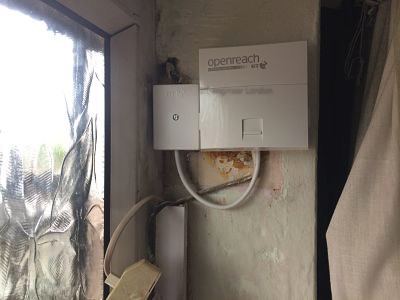
The first was a converted Victorian on Tulse Hill, just where Brixton Hill becomes Tulse Hill proper. Top-floor flat, the only flat in the building still on the original communal master socket, which lived in the ground-floor hallway behind a meter cupboard. The owner had been told her line tested fine but her FTTC speed was barely 20 Mbps. I attended, opened the meter cupboard, found the original NTE5A from approximately 1992 with three flats' extension wiring all paralleled onto it. We separated the wiring properly — fitted a current NTE5C for her flat with the OpenReach pair correctly terminated to her line only — and ran a clean CW1308 up the building's service riser into her flat where I installed a faceplate with VDSL filter. Sync came up to 68 Mbps within the hour. Her neighbours' lines were unaffected because they'd never actually been hers in the first place.
The second was a record shop on Atlantic Road, in the market arcade. The owner was running an EPOS system, a card reader, a streaming setup for in-store music previews, and the shop's CCTV all through a single ageing ISP router perched on top of a vinyl rack. WiFi was congested, the card reader was dropping, and the CCTV recorder kept losing the cloud backup. I attended over a quieter Monday morning, ran four Cat6 drops from a small wall-mounted patch panel near the back door to the till, the card reader location, the CCTV recorder and the streaming PC. Fitted a basic managed switch and put the CCTV on its own VLAN. Took the entire load off WiFi for the critical kit and kept WiFi for the customer-facing in-store demo iPads. No more dropped transactions, no more lost backups.
The third was a family in Herne Hill — a substantial Edwardian terrace on Stradella Road. Three storeys, basement converted into a den, loft converted into a primary bedroom suite. The brief was simple: reliable WiFi everywhere, plus a wired connection to the home cinema in the basement. The router was in a downstairs hall cupboard, which delivered fine WiFi to the hall and very little to the loft or the basement. I ran Cat6 from the hall up the corner of the stair void to an access point on the second-floor landing, and another Cat6 down into the basement to a wall-plate behind the AV cabinet. Ceiling-mounted UniFi access points on the ground and second floors, the basement on a wired connection for the cinema. Whole-house coverage from one SSID, no roaming issues, fully tested. The kids stopped complaining about the WiFi within an hour.
The market arcades and the railway arches
Brixton Market and Pop Brixton between them house a remarkable density of small businesses — food stalls, vinyl dealers, vintage clothing, small services. Telecoms in these arcades is uneven. Some units have proper line installations done by OpenReach to a current standard; some are still working off ad-hoc cabling that the previous tenant left behind. When I fit out a market unit, the priority is wired infrastructure for anything revenue-critical and a separate guest WiFi for customers. The market environment is electrically noisy — lots of refrigeration, lots of fluorescent lighting, lots of competing 2.4GHz devices — so wireless reliability for critical kit is not something you can count on.
The railway arches between Brixton station and Loughborough Junction house a different kind of business — music studios, makers' spaces, light industrial units. The brickwork is dense, the spaces are big, and the original telecoms infrastructure into many arches is minimal. We've done Cat6 fit-outs in several arches where the demand was structured cabling for a studio rather than just a phone line. Damp is a consideration here — cable that has to enter from outside has to be properly armoured and weather-protected.
Conservation considerations
Parts of Brixton sit within conservation areas — particularly around Brixton Hill, parts of Herne Hill, and the older terraces near Loughborough Park. The restrictions are less heavy than central London listing but still mean it's worth checking before drilling any external wall. Where new external work is needed, we work with what's already there — usually following the existing OpenReach drop route rather than opening a fresh hole.
Internally, Brixton's Victorian and Edwardian housing has the usual mix of suspended timber ground floors, lath-and-plaster walls and original cornicing. The same approach as the rest of London — lift boards rather than chase walls where possible, work in service risers where the building has them, and use discreet trunking where chasing isn't appropriate.
FTTC, FTTP and the Brixton exchange picture
Brixton sits across the Brixton and Streatham exchange catchments, with cabinets along the main roads. FTTC has been live for years; FTTP is rolling through SW2 and SW9 steadily, with a lot of streets now showing availability. As ever, I check OpenReach for any specific address before quoting work that depends on a particular product.
What I see consistently in Brixton FTTC jobs is that internal wiring is the limiting factor far more often than the cabinet. A flat that's been told it can take 65 Mbps and is delivering 22 Mbps is almost always carrying extension wiring that's bleeding the signal. Strip it back, fit a current faceplate, and the numbers come up.
Telling me about the job on the phone
For Brixton work, the useful information up front is:
- Type of property — converted Victorian, Edwardian family terrace, post-war block, commercial unit.
- Which ISP and which product.
- Where the master socket is, if you can see it.
- Where the problem is showing up — line crackling, broadband slow, WiFi not reaching.
- For businesses, what's failing and how often.
I cover Brixton regularly, work weekdays and Saturdays, and can typically attend within 24 to 48 hours. Same-day visits are possible where the diary allows and the work doesn't depend on parts I don't already carry on the van.
Why most slow-broadband complaints in Brixton aren't the line
One of the most common ways a Brixton job starts is ‘my ISP says the line is fine but my broadband is terrible’. Nine times in ten, the ISP is correct that the line is fine, and the customer is correct that the broadband is terrible. Both can be true. The line tests at the master socket. The router sits four metres away with a daisy-chain of bad extension wiring between the two, and that daisy-chain is converting a healthy VDSL signal into something the router can barely sync to.
The diagnostic that catches this every time is plugging the router into the engineer's test socket directly. If sync rises immediately, the fault is the internal wiring. If sync stays the same, the issue is elsewhere — copper distance to the cabinet, drop wire condition, or a service-side problem that needs OpenReach. I do this test on every Brixton broadband complaint before doing anything else. It often turns a vague ‘my internet is rubbish’ complaint into a clear, fixable cabling job.
What I look for next, once the line side is confirmed clean:
- Internal extension wiring run in long parallel daisy chains rather than proper star topology.
- Old ADSL-era splitters and filters left in series with a VDSL line — they don't belong there with a current NTE5C faceplate.
- Router placement that puts the WiFi behind a chimney breast or a thick internal wall.
- Powerline adapters running on a different ring main from the router, with all the latency that introduces.
- WiFi extenders chained two or three deep, each halving the available bandwidth.
Conversions and the question of whose master socket it is
A specifically Brixton problem in converted Victorian terraces is working out which flat's master socket is which. When a single house got carved into three or four flats over the last fifty years, sometimes properly and sometimes not, the OpenReach drops and the internal extensions don't always match the way the flats are now arranged. It's not unusual to find that the master socket labelled with one flat's number actually serves a different flat, or that two flats are sharing what was originally a single line.
Sorting this out properly sometimes needs OpenReach to attend and re-jumper the lines at the distribution point. I can identify the problem and document it clearly for the customer to take to their ISP, which usually accelerates the right kind of engineering visit. Where the fault is something I can fix on the customer's side — re-terminating the internal cable to the right flat, fitting a new faceplate, removing parallel wiring — I'll do that on the same visit.
Tenants, landlords and houses in multiple occupation
A lot of Brixton's residential property is rented and a significant share of that is in houses in multiple occupation. The decisions about what gets fixed and what gets ignored are often made by a landlord rather than the people living in the property. I'm happy to work for either tenants or landlords, but it's worth being clear up front who's commissioning the work because that affects what we can do.
For tenants ringing me directly about an issue in a rented property: I can attend and diagnose, but anything that involves drilling, fitting new sockets, or making physical changes to the building usually needs landlord consent. Cleaning up existing wiring, replacing a failed faceplate or re-terminating an existing extension is normally fine without explicit consent because it's just remediation of existing infrastructure.
What the finished Brixton install looks like
The standard I aim for in every Brixton job — residential or commercial:
- A current-spec NTE5C master socket with VDSL faceplate where applicable, fitted in a sensible accessible location.
- Internal extensions wired in star topology from the master, not daisy-chained.
- Old, redundant cable removed entirely rather than left coiled in the wall.
- WiFi access points wired back to the router with proper Cat6 where the geometry of the property demands it.
- A Fluke test certificate for any new structured cabling work.
- The cable management at the router tidy and labelled.
- A short verbal handover so the customer understands what was done and why.
Ring me on 020 3633 1131 and we can talk through whatever the issue is in your Brixton property. Most jobs can be quoted from a short phone call.
Ring 020 3633 1131. Advice freely given.